


Sumio: Net Worth Tracker
3.85.00 Reviews
App Specs
- Version
- 1.9.18
- Updated On
- License
- Free
- Downloads
- 10,000+
- Developer
- Fiduciary
- Categories
- Finance
- Platform
- Android
Screenshots
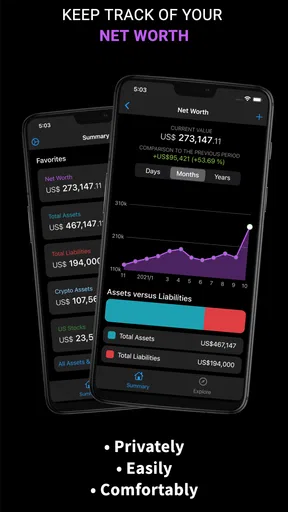
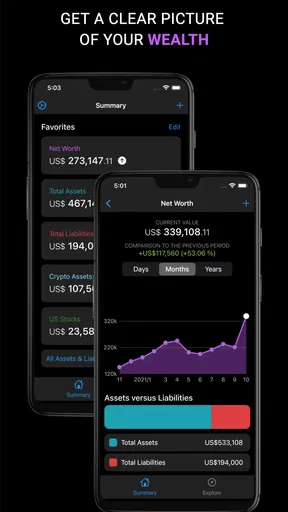
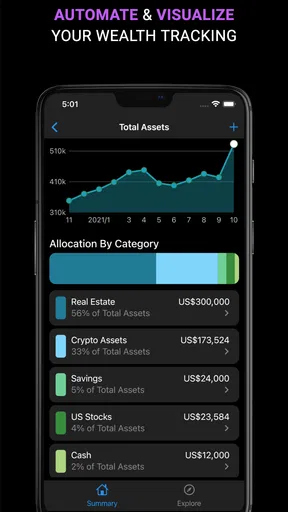
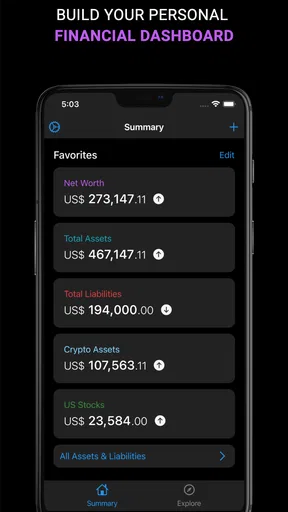
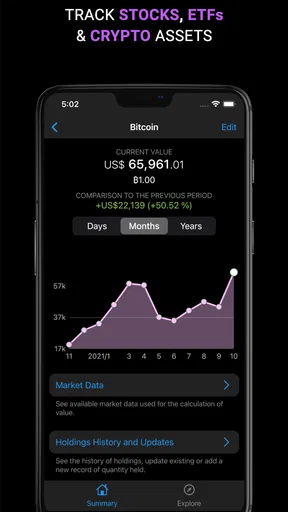
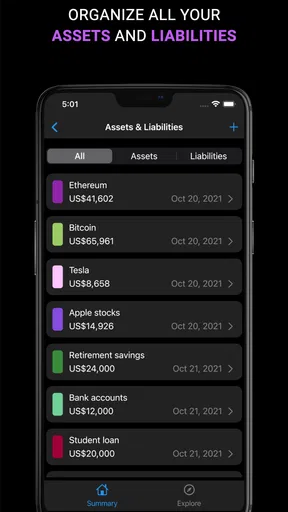
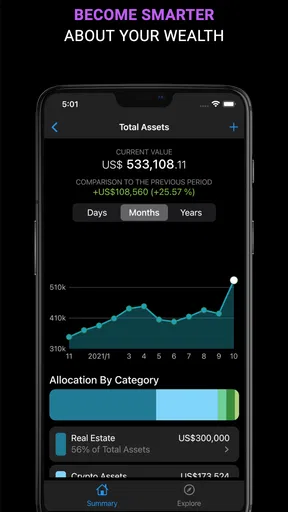
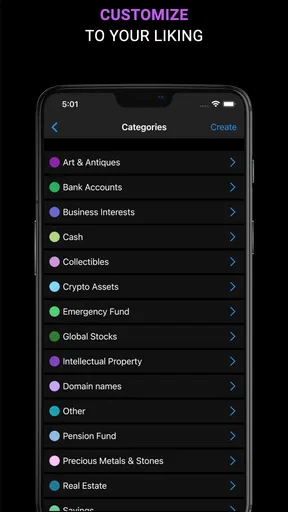
 Analysis by AppCompare
I spent time with Sumio: Net Worth Tracker as a personal finance app, and my first impression was that it is aimed at people who want a clearer picture of their financial position rather than another place to make everyday payments. Its focus is net worth, investments, stocks, funds, and other assets, so the useful question is not simply whether it opens quickly, but whether it helps you keep a meaningful overview without turning money management into a chore.
That distinction matters. A banking app is usually built around transactions, balances, transfers, and card activity. Sumio takes a wider view: what you own, what you invest in, and how those pieces affect your overall position. In my experience, that makes it more suitable for regular check-ins than constant monitoring. I would recommend it to someone who wants a dedicated snapshot of their financial direction, while being more cautious about recommending it as a replacement for a bank, broker, or detailed tax tool.
How Sumio feels during everyday use
I use Sumio as a prompt to pause and look at my finances as a whole, rather than as a live record of every account. That makes the routine most useful when I decide in advance what I want to check and keep the underlying figures organized. From there, the key question is how much confidence to place in a consolidated view of sensitive financial information.
A focused approach to net worth tracking
The app’s central idea is simple but useful: instead of judging your finances from one account at a time, you bring assets and investments into one broader view. That can change how you think about money. A savings balance may look reassuring on its own, while an investment portfolio, funds, stocks, and other assets tell a more complete story when considered together.
I found this approach most helpful for people who already have more than one financial destination. If your money is divided between a bank account, an investment account, and personal assets, checking each place separately can make progress difficult to see. A net worth tracker gives those pieces a common purpose. The benefit is less about watching every small movement and more about spotting the direction of your finances over time.
The app is free to install, which lowers the barrier to trying it. It also includes in-app purchases priced from $2.99 to $29.99 per item, so anyone considering extended use should look carefully at which parts of the experience require payment. I would begin with a small, realistic setup rather than entering every financial detail immediately. That makes it easier to judge whether the workflow suits you before you invest time in building a complete picture.
What happens when the app opens
For a finance app like this, perceived speed is mainly about whether the path from opening the app to seeing useful information feels direct. Sumio’s purpose is narrow enough that it should not need the visual complexity of a full banking suite. That is a strength: an app built around a single financial overview can feel less distracting than an app packed with cards, transfers, offers, notifications, and unrelated account services.
Worth Reading Before You Choose

EA SPORTS FC Mobile 26 Is a Bigger Football Game, but It Takes Time

Flipboard Shows What News Apps Must Do Beyond the Feed

Switching to Android Auto Means Rethinking Your Driving Routine

Google Calendar Makes a Crowded Week Easier to Manage

Ludo King Makes the Most of the Minutes Between Plans

Baby Panda World Brings Quick Play to Modern Phones, but Its Game Library Feels Busy
I would not judge it by the speed of a live trading platform. Its role is different. If you are expecting second-by-second market information, instant order execution, or the depth of a professional portfolio terminal, this is not the right comparison. The app is better understood as a personal dashboard. Its value comes from organizing the information you choose to track, not from replacing the systems where transactions actually happen.
That also affects how I would use it. I would open it during a weekly or monthly money review, not repeatedly throughout the day. A quick check can answer practical questions: Has my overall position improved? Are my investments becoming too dominant? Am I still tracking the assets that matter to me? This rhythm keeps the app useful without encouraging anxious reactions to every market change.
Heavy-use moments and practical workflows
The most demanding moment is likely to be the initial setup of a complete financial overview. Adding several accounts, investments, funds, stocks, and personal assets requires attention, especially if you want the result to remain accurate. This is where a tracker can feel more like a small personal project than a casual app. I recommend collecting the figures first and entering them in groups, starting with the assets that have the biggest effect on your total.
A practical workflow is to create a baseline on a quiet day, then decide how often each category should be updated. Bank balances may deserve more frequent attention than a long-term asset. Investments can be reviewed on a schedule rather than after every price change. The point is to avoid mixing different update habits and then treating the resulting total as perfectly current.
Another useful workflow is to separate “what I own” from “what I can spend.” Net worth includes assets that may not be immediately available for daily expenses. That makes the app valuable for long-term planning, but potentially misleading if you use the total as your emergency cash figure. I would keep a separate mental or written distinction between liquid money and assets that would take time, fees, or market movement to convert into cash.
For someone preparing a monthly budget, the app can provide context rather than replace the budget itself. A budget explains where money goes during a period; a net worth tracker helps show whether those choices are improving your broader position. Using both views together is more informative than expecting one tool to do both jobs.
Stability, recovery, and trust
Reliability is especially important in finance because a small mistake can change how you interpret your situation. I would treat Sumio as a tracking aid and verify important figures against the original bank, broker, or account source before making a major decision. The app can help gather your view of your finances, but the source accounts remain the authority for current balances and transaction details.
My preferred habit with any manually maintained financial tracker is to update it calmly and review the totals after changes. If something looks unexpectedly different, I would retrace the last edit instead of assuming the market or my spending caused it. This is one of the less obvious trade-offs of a consolidated dashboard: it is convenient, but convenience depends on disciplined inputs.
Recovery also means being able to return to a routine after a period of neglect. If you stop updating a tracker for several months, the best way back is not to rebuild everything at once. Start with current balances, identify the categories that matter most, and then fill in the rest. A tool that supports this kind of gradual recovery is more useful than one that only works when every detail is maintained perfectly.
Because Sumio is published by Fiduciary, I would still approach it with the same care I use for any app that handles sensitive financial information. I would avoid entering details I do not need for the overview, keep my device protected, and make sure I understand how the app fits into my wider record-keeping routine. The app’s convenience should not encourage careless handling of personal money information.
Where device age can change the experience
The listed minimum operating system is Android 7.0, so the app is available to people using older Android devices as well as newer phones. That is helpful for accessibility, but older hardware can behave differently from current devices. Storage pressure, limited memory, battery-saving settings, and an aging system can all affect how quickly any finance dashboard opens or refreshes.
If the app feels slow on an older phone, I would first reduce background clutter, close unused applications, and check that the device has reasonable free storage. I would also avoid judging the app during a moment when the phone is performing system maintenance or restoring other applications. These steps do not change the app itself, but they can make the difference between a smooth check-in and a frustrating one.
On a newer device, the bigger limitation is likely to be workflow rather than raw performance. A fast phone does not remove the need to keep financial figures organized. If you enter inconsistent values or update some assets while ignoring others, the dashboard may look polished while still giving you an incomplete picture. In other words, device performance can improve responsiveness, but it cannot correct an untidy tracking method.
I also would not choose this app solely because it supports an older Android version. Compatibility is useful, but finance apps should be judged by how comfortable you are maintaining accurate information and how well the process fits your habits. Someone with a very old phone who rarely updates apps may prefer a simpler record in a secure spreadsheet or notebook, while someone with multiple investments may appreciate a dedicated overview.
Who will get the most from it
Sumio makes the most sense for a person who wants to see a combined view of investments and assets without relying on several disconnected screens. It is particularly appealing if you are beginning to think in terms of net worth, not just monthly income. The app can give structure to a financial review and make long-term progress easier to discuss with yourself or a partner.
It is also a reasonable fit for someone who prefers manual control over an automated financial connection. Entering information yourself takes more effort, but it can make you more aware of what each figure represents. That awareness is valuable when your assets are spread across different providers or when you do not want every account connected to one service.
On the other hand, I would skip it if your main need is daily spending categorization, bill payment, bank transfers, or live trading. A traditional banking app is better for transactions, a brokerage platform is better for orders and market tools, and a budgeting application may be better for detailed expense planning. Sumio occupies the space between those tools: it helps frame the bigger financial picture, but it is not designed to replace every specialized service.
I would also hesitate to recommend it to someone who will not update their figures. A stale net worth total can create false confidence, especially when investments or account balances change. The app rewards a modest, repeatable routine more than an enthusiastic one-time setup. If you know you will only open it once and forget it, its central benefit will fade quickly.
How it compares with familiar alternatives
Compared with a spreadsheet, Sumio should feel more purpose-built for tracking assets and investments. A spreadsheet offers almost unlimited customization, formulas, notes, and historical structures, but it also asks you to design and maintain the system yourself. Sumio is the more approachable choice when you want a ready-made financial overview and do not want to build the layout from scratch.
Compared with a bank application, the difference is scope. A bank app is usually strongest at showing activity inside that institution. Sumio is intended to help you think across assets, stocks, funds, and investments, which is more useful when your financial life is spread out. The trade-off is that a broader overview may require more personal upkeep than a bank app that already knows its own transactions.
Compared with a portfolio tracker, Sumio appears more balanced between investments and total personal wealth. A specialist portfolio tool may offer deeper market analysis, richer performance views, or more detailed trading information. I would choose that kind of tool if investment decisions are my main concern. I would choose Sumio when I want investments to sit alongside the rest of my assets instead of becoming the entire story.
Compared with a budgeting app, the emphasis is also different. Budgeting is about controlling flows of money; net worth tracking is about observing the accumulated result. Neither view is enough by itself for everyone. The strongest setup may be to use a budgeting tool for daily decisions and Sumio for a periodic financial review, provided you are willing to maintain both without duplicating unnecessary work.
Small habits that make the overview more useful
My first tip is to establish a consistent valuation rule. If you update one asset at its latest visible value but estimate another using an old figure, the total may look precise while combining mismatched dates. I would record the date of each review in my own notes and try to update the major categories during the same session. This makes comparisons more meaningful.
My second tip is to avoid treating every asset as equally important. Start with the categories that materially change your financial position. A long list can feel thorough, but it may create maintenance work without improving your decisions. A shorter, accurate overview is more useful than a detailed one that becomes outdated.
My third tip is to use the app for questions, not just totals. Before opening it, decide what you want to learn: whether your investment share is growing too quickly, whether your savings target is realistic, or whether a large purchase would significantly change your position. This turns a passive dashboard into a decision-making checkpoint and reduces the temptation to stare at a number without context.
There is also a worthwhile emotional trade-off. Seeing a net worth figure can be motivating when progress is steady, but market declines may make the same screen stressful. I would review long-term trends rather than react to a single disappointing update. If checking the total makes you change a sensible plan impulsively, less frequent reviews may be healthier and more productive.
Version, audience, and overall performance judgement
The current version is 1.9.18, and the app is rated for Everyone. It has reached over 10 thousand installs and holds an average rating of 3.8 from around 78 ratings, which suggests a modest user base and a mixed but generally workable reception. I would interpret that as a reason to try it personally rather than assuming it will suit every financial routine.
In performance terms, Sumio’s strongest quality is its focused purpose. It does not need to compete with a trading terminal or a full banking platform to be useful. When used for periodic net worth reviews, it should be judged by how little friction it adds between opening the app and understanding your financial position. Its main resource demand is not something I would measure in battery or storage; it is the attention required to keep the information meaningful.
My final recommendation is therefore conditional but positive. I would suggest Sumio to someone who wants a dedicated Android tool for bringing assets and investments into one personal overview, especially if they are comfortable maintaining figures deliberately. I would not suggest it as the only finance app for someone who needs transaction management, detailed spending analysis, or professional investment research.
Sumio works best as a calm financial checkpoint, not an always-on command center. Used that way, it can make scattered accounts and investments easier to understand. The free entry point makes experimentation straightforward, while the paid items mean you should decide whether the extra value matches your routine before committing further. For me, its worth comes from encouraging a broader view of money without pretending that one dashboard can replace every financial tool.
Pros
- Clean dashboard makes net worth changes easy to understand.
- Supports multiple account types for a more complete financial overview.
- Manual entries allow tracking assets that lack bank integration.
- Helpful charts reveal long-term wealth and spending trends.
- Useful reminders encourage regular updates to financial data.
Cons
- Some features may require a paid subscription.
- Manual updates can become tedious with many accounts.
- Bank connectivity may vary by country or financial institution.
- Investment values may not refresh instantly.
- Limited budgeting tools compared with dedicated finance apps.
FAQs for Sumio: Net Worth Tracker
What is Sumio: Net Worth Tracker used for?
Sumio: Net Worth Tracker is a personal finance app designed to help you monitor your overall financial position in one place. You can record assets such as bank accounts, investments, property, and digital currencies, then compare them with debts and other liabilities. The app focuses on net worth visibility, making it easier to follow financial progress over time rather than only tracking daily spending.
How does Sumio calculate my net worth?
The app calculates net worth by subtracting your total liabilities from your total assets. You can add accounts, investments, real estate, vehicles, cash, loans, credit card balances, and other financial items, depending on the information you want to track. Because results depend on the values you enter or synchronize, keeping balances and asset prices updated is important for an accurate overview.
Can Sumio connect to my bank and investment accounts?
Sumio may support account connections or imported financial data depending on your country, financial institution, and the version of the app available on your device. Availability can vary, so users should check the connection options before relying on automatic synchronization. If a provider is unsupported, you can generally track information manually, although this requires more regular maintenance.
Is Sumio: Net Worth Tracker free to download and use?
The application can typically be downloaded without an upfront charge, but some features may require a premium subscription or in-app purchase. Advanced tools, unlimited accounts, automatic updates, detailed charts, or additional customization may be restricted depending on the current plan. Before subscribing, review the pricing, trial period, renewal terms, and cancellation process shown in the app store.
Is my financial information safe when using Sumio?
Before entering sensitive information, review Sumio’s privacy policy and the permissions requested by the app. If you connect external accounts, the security of that connection may also depend on the financial-data provider used. Avoid sharing passwords, enable device security such as a passcode or biometric lock, and verify whether information is stored locally, synchronized online, or shared with third parties.


